DuckPipe: process sensitive client data with nothing but a browser and some SQL
by Andrew Le Breuilly, Co-Chair, Association for Survey Computing
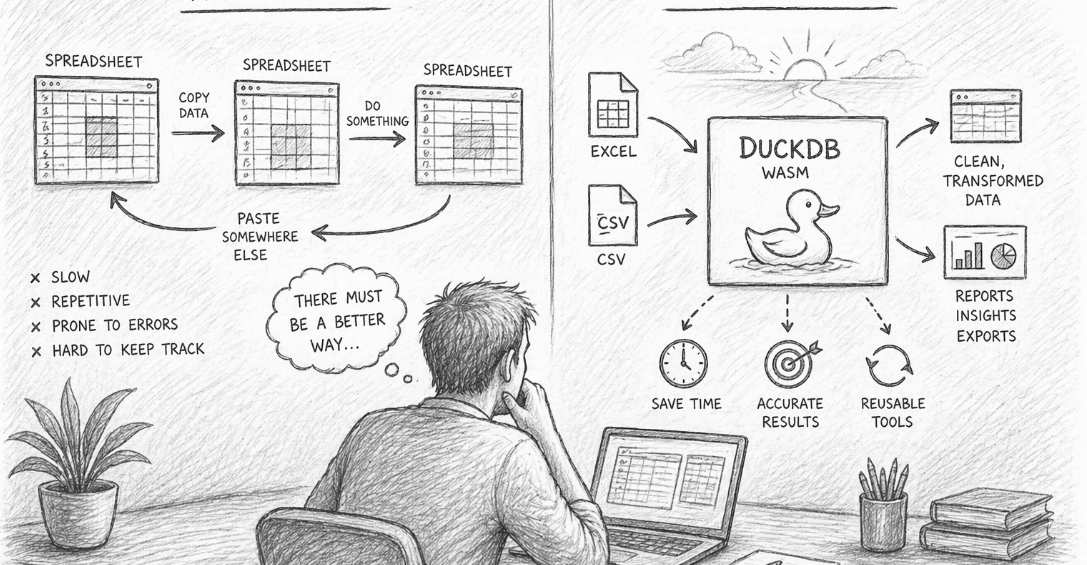
At our latest ASC Labs Coffee Morning, I shared a small tool I’d built called DuckPipe, a way to load a CSV, write a SQL query against it, and download the result, entirely inside a web browser. No installs, no servers, and critically for survey data, nothing ever leaves your machine.
This post pulls together everything from the session: what the tool does, how it works, the example scripts we ran through live, and the GitHub repo so you can take it apart, fork it, or just use it as-is.
The problem it’s solving
As a consultant, my goal is usually to hand as much work as possible back to the client so they can run it themselves. That creates an awkward middle ground. At one end, you’ve got specialist tools, an SPSS add-in, say, that might cost a client a four-figure annual licence just to process one type of file. At the other end, you’ve got a Python script that runs perfectly on your machine but needs an environment setting up before anyone else can touch it. Handing a client a .py file and a pip install instruction is rarely a good time for anyone.
What you actually want, most of the time, is something repeatable, free, and so simple that “if I get hit by a bus” stops being a real risk to the workflow. And when the file in question is a client’s list of contacts or survey respondents, you also don’t want to be uploading it anywhere you don’t control.
Enter DuckDB
DuckDB is a lightweight analytical database that, among other things, ships a WebAssembly build, DuckDB-Wasm, meaning it can run a full SQL engine inside a browser tab. The browser downloads a small package behind the scenes, but your actual data never goes anywhere near a server. You can prove it to yourself by loading a file, then switching to airplane mode: it keeps working.
That combination of real SQL, zero install, and zero upload is what DuckPipe is built on.
How DuckPipe works
The full version is a single web page. Drag in a CSV and it’s instantly inspected: column names and types are detected automatically and exposed as a table called data. From there you write whatever SQL you like against that table, hit Run, and see a preview of the results immediately. When you’re happy, you download the output as a CSV.
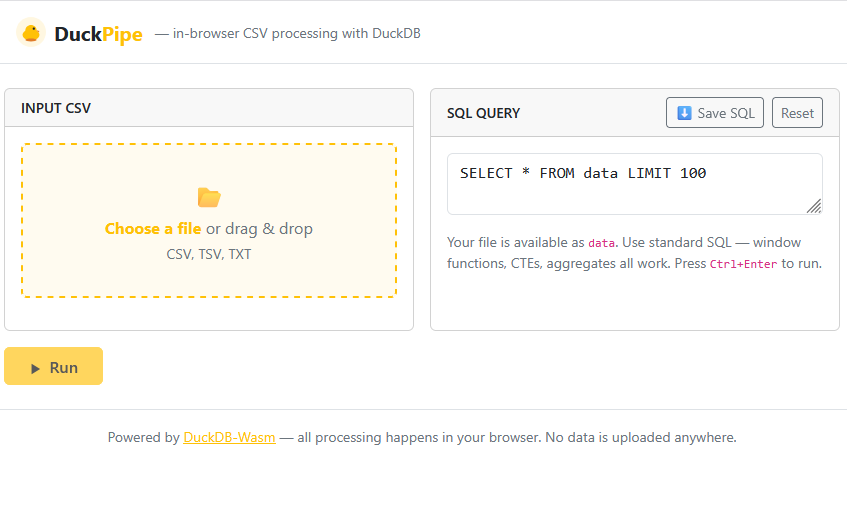
Two extra buttons make it useful beyond a one-off play: Save SQL writes your query out as a .sql file so you can reuse or hand it on, and once a client sends you their next file, you just drop it in, paste the same script back in, and run it again.
The README sums up the feature set as:
- Zero backend: everything runs in your browser via DuckDB-Wasm
- Full SQL: window functions, CTEs,
PIVOT, aggregates, string functions, and more - Auto type inference: DuckDB detects column types automatically
- Download results as CSV
- Save your SQL script as a
.sqlfile - Lite mode: file-in, file-out with no UI overhead
It works in any modern browser with WebAssembly support: Chrome, Edge, Firefox, Safari.
Three worked examples
These are the scripts we ran through live in the session, using a generic 500-row CSV of fake employee data (ID, Name, Age, Country, Email, Phone, Address, Company, DateJoined, Salary). Every script below assumes your file is loaded as the table data, so you can point them at any CSV with matching column names.
A simple filter and sort: pull back employees over 40, ordered by salary:
sql
-- Simple select: employees over 40, ordered by salary descending
SELECT
    ID,
    Name,
    Age,
    Country,
    Salary
FROM data
WHERE Age > 40
ORDER BY Salary DESC
LIMIT 50;
Building a formatted label by concatenating columns: this is the kind of thing that normally turns into a nest of Excel formulas. In SQL, || concatenates strings, so you can build an Outlook-style “Name <email>” field, a combined address, or an employment summary in one line each:
sql
-- Concatenate fields to build a formatted contact label
SELECT
    ID,
    Name || ' <' || Email || '>'             AS contact,
    Address || ', ' || Country               AS location,
    Company || ' (joined ' || DateJoined || ')' AS employment
FROM data
ORDER BY Name
LIMIT 50;
Regular expressions and aggregation together: this one pulls the domain out of each email address with regexp_extract, validates the format with regexp_matches, and then summarises headcount and salary stats per domain:
sql
-- Use regexp_extract to pull the domain from each email address,
-- then summarise headcount and average salary per domain
SELECT
    regexp_extract(Email, '@(.+)$', 1)  AS email_domain,
    COUNT(*)                             AS headcount,
    ROUND(AVG(Salary), 0)               AS avg_salary,
    MIN(Salary)                          AS min_salary,
    MAX(Salary)                          AS max_salary
FROM data
WHERE regexp_matches(Email, '^[a-z0-9._%+\-]+@[a-z0-9.\-]+\.[a-z]{2,}$')
GROUP BY email_domain
ORDER BY headcount DESC;
No Excel, no dragging formulas down a column, no helper tabs, and because it’s just a query against a generic data table, the same script runs again next month against next month’s export.
The lite version: for when you don’t want the client touching SQL
There’s also a stripped-down version, lite.html, with none of the editor or preview UI. You drop in a CSV, drop in a .sql file, hit Run & Save, and it downloads the result automatically. That’s the version I’d actually hand to a client: they don’t need to see or understand the SQL at all, and there’s nothing for them to accidentally edit. You can literally email someone the HTML file and it runs as a standalone program on their machine.
Built without writing a line of JavaScript
I’ll be upfront: I vibe coded the whole thing. My own JavaScript is not good. I’m much more of a SQL and Python person, so I leaned entirely on Claude (via Claude Code inside VS Code) to write it. The opening prompt was about as simple as it gets:
“I’d like to create a simple DuckDB WASM web page where the user can point to a CSV file on their PC and a SQL script and they can press run, preview the data and then download it. It’s important that it’s all in browser. The product’s called DuckPipe.”
From there it was a back-and-forth of small, specific asks: add the ability to save the SQL script, add a lite mode, tidy up the schema panel, refining each time rather than trying to specify everything up front. I didn’t write a line of the JavaScript or CSS myself, but I still read through what it produced at each step. Knowing roughly what the code is doing matters, especially when you’re going to hand the result to a client.
The same approach is useful even if you’re comfortable with SQL: my regular expressions are genuinely terrible, and writing the email-domain pattern above by hand would have taken me the best part of half an hour. Describing what I wanted and letting Claude draft the regex, then checking it against real data, took about a minute.
Why SQL rather than just asking Claude to write Python?
This came up in discussion, and it’s worth recording the answer. You could absolutely get Claude to write the same logic in Python. The difference is distribution: a Python script needs an environment on the other end, an interpreter, packages, someone comfortable running it. A SQL query embedded in a static HTML page needs nothing but a browser. You can email it, run it on a phone, run it with no internet connection, and it just works. There’s also a practical argument that more people have at least a passing familiarity with basic SQL than with Python, so a client’s team is more likely to have someone who can sanity-check the query if needed.
None of which means SQL is always the right call. It’s genuinely horses for courses. But for this specific shape of problem (recurring, sensitive, handed off to someone non-technical) it has real advantages.
Where this idea can go further
DuckPipe is deliberately minimal, and that’s the point of it. If you want to see how far the same underlying idea (DuckDB-Wasm running entirely client-side) can be pushed, take a look at SQLRooms, an open-source React framework built on the same technology. Their examples include a full SQL editor with a much richer interface, an AI-powered mode where you can chat with your data directly (you’ll need your own API key, which is fair enough), and integrations for mapping and joining multiple tables together. It’s a good next stop if you outgrow what a single static HTML file can do.
Try it yourself
| What | Link |
|---|---|
| Full tool (drag, write SQL, preview, download) | https://association-for-survey-computing.github.io/duck-pipe/ |
| Lite tool (file in, file out, no UI) | https://association-for-survey-computing.github.io/duck-pipe/lite.html |
| Source code (MIT licensed) | https://github.com/Association-for-Survey-Computing/duck-pipe/ |
| Sample dataset used in the demo | https://sample-files.com/downloads/data/csv/large-dataset.csv |
A couple of attendees found their work network blocked the sample-files.com download as a “threat” during the session. If that happens to you, don’t worry about it. DuckPipe works with any CSV, so just point it at any file you’ve got lying around to follow along with the three examples above.
Get involved
The repo is open source under the MIT licence, and contributions are welcome. The project’s own contributing guide specifically calls out additional SQL examples as in-scope, so if you build something useful on top of this, a pull request adding it to the README would be very welcome. Bug reports, browser-compatibility fixes, and UX tweaks to either mode are also fair game; server-side processing and non-CSV formats are explicitly out of scope, by design.
And as always, the ASC Labs sessions run on whatever the community finds useful. If there’s a tool, technique, or topic you’d like to see covered in a future Coffee Morning, let us know.